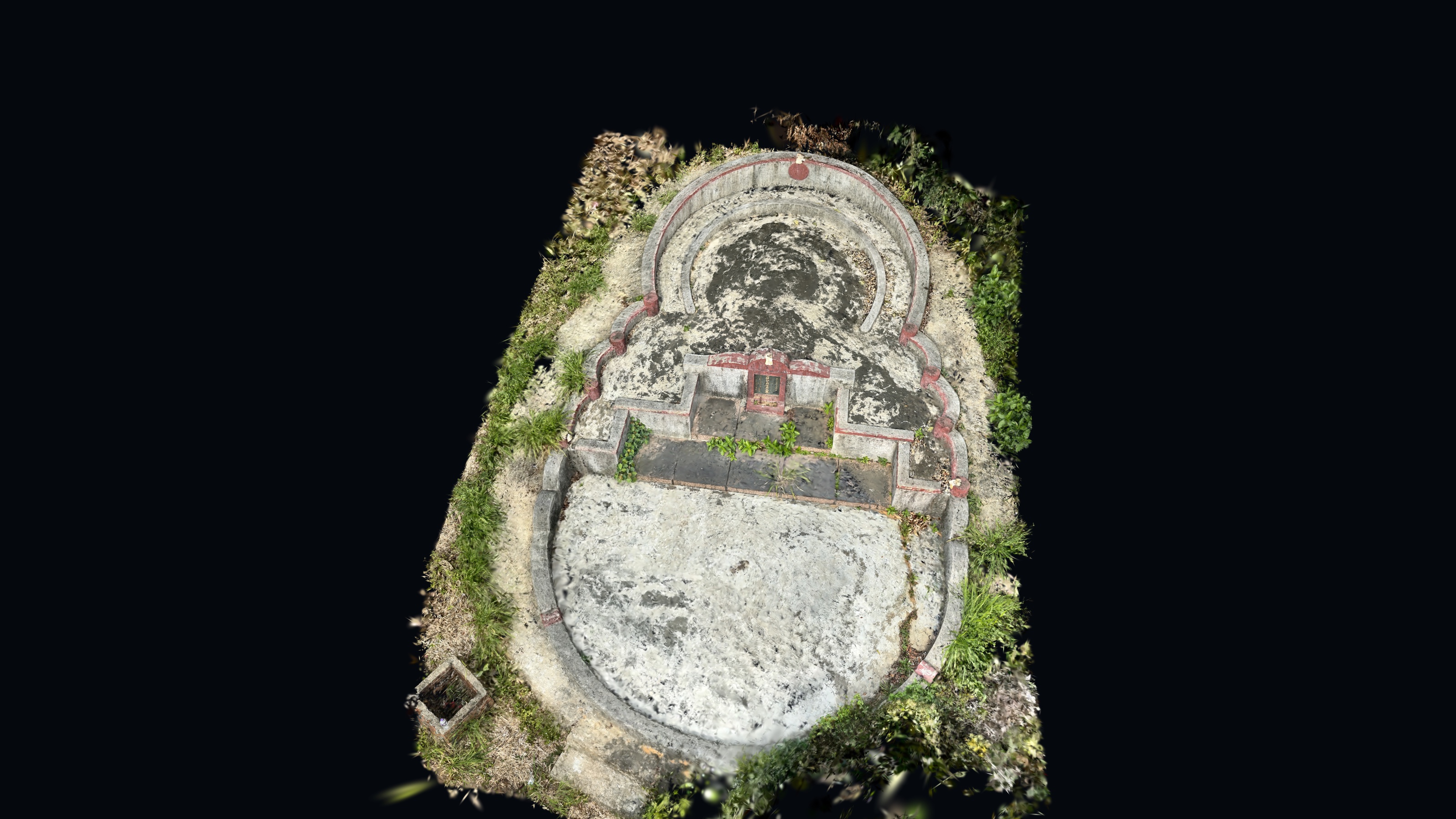
3D Capture & Reconstruction
2024 · 6 tools
Mobile LiDAR grave survey prototype
iPhone LiDAR workflow for compensation grave surveys — one operator, around 2 minutes per grave, digital records.
scroll ↓
01 / the problem
Grave surveys for land resumption still run on paper-based tape, sketch and manual grid counting.
- 4–5 staff per grave · 10–15 min in the field · 15–30 min of office processing
- Area by grid counting, drawn and counted by hand manually
- Measurement by tape, error prone, slow and subjective
- Paper sketch output, no audit trail, no re-measurement, no shared record
02 / approach
What changed from the manual method
Design a single-operator workflow: walk the grave at 1–2 m, capture mesh + photos + GNSS in one pass
Build the Unity prototype: 3D inspection, boundary delineation, area/height computation, plan export
Test the claims: distance, height, area vs RTK, repeatability, drift, location recording performance
Run user acceptance testing with field officers, including a manual-input fallback
03 / workflow
On-device, just a phone
Walk around the grave at 1–2 m with a steady, overlapping scan path
Capture 3D mesh, photographs and GNSS position in a single pass
Inspect the model in-app: top view, side view, then delineate the grave boundary
Derive area and height from the model instead of tape readings and grid counting
Export top-view / side-view plans and the digital grave record
Fallback: input measured points manually where dense vegetation defeats the scan
04 / implementation
- 1 · The problem
- 2 · What changed
- 3 · How it works
- 4 · See it running
Inside the measurement loop
- 01
Capture
ARKit fuses depth, confidence and pose into a mesh on the phone.
- 02
Mesh
Decimated and cleaned so a 2–3 min scan opens on the device.
- 03
Boundary
Points placed in 3D, projected to an orthographic top view.
- 04
Measure
Area by integration; height from the same mesh, side view.
- 05
Export
Top / side-view plans plus the record, ready for the land system.
Capture
ARKitiPhone LiDAR scene reconstruction: per-frame depth, confidence and device pose fused on device into a triangle mesh; operator walks the grave at 1–2 m so the sampling density stays inside the sensor's accurate range.
Mesh handling
UnityMesh decimation and cleanup so a 2–3 minute scan opens and orbits smoothly on the phone itself — no desktop post-processing step, which is what makes a same-visit record possible.
Boundary
orthographic projectionBoundary points are placed on the mesh in 3D, then projected to an orthographic top view so the plan has no perspective distortion and the polygon matches the surveyed geometry.
Area
integration, not grid countingArea comes from polygon integration of the delineated boundary; curved segments use Lagrange interpolation as an exact-fit curve instead of straight chords, which is where manual grid counting loses most of its error.
Height
side projectionA side-view projection gives the highest and lowest points of the structure, so height is derived from the same mesh as the area rather than from a separate tape measurement.
Position + export
Each record stores an iPhone GNSS fix (0.20–1.06 m, adequate for locating a grave, not for cadastral use) together with the mesh, photos, dimensions and generated top / side-view plans for the land-records system.
results
- 4–5 → 1
- Manpower / grave
- 1–2 min
- Field time / grave
- 2–5 min
- Office time / grave
- SD 0.019 m²
- Area repeatability
- 0.20–1.06 m
- GNSS position
~80% reduction
was 10–15 min
was 15–30 min
25 repeated scans
tolerance 5–10 m
04 / build
What the app is actually made of
The prototype is not a photogrammetry demo with a measuring tape bolted on. Every choice below was made against a specific failure mode observed in the field.
Depth, not photographs
Apple offers ARKit for sensing and RealityKit for rendering. ARKit's Depth API won over photogrammetry because its LiDAR illumination is independent of sunlight and shade, and a complete grave scan finishes in one to two minutes.
Unity, because the job is measurement
Unreal and Godot were both evaluated. Unreal was heavier than the task needed; Godot's 3D and AR ecosystem was thinner. Unity gave a light runtime with mature geometry tooling, which is what a measuring app requires.
Mesh to record in one screen
Inside the app the officer rotates and zooms the captured mesh, switches between top and side view, traces the grave boundary, and gets area and height from that boundary — then exports the plan and the record together.
Location attached to the record
CoreLocation saves the device position with the grave, using the LandsD base map as the default background, a satellite toggle for rural sites, and a live accuracy readout so the officer knows whether the fix is usable.
A fallback that admits defeat
Where vegetation hides the boundary, the scanner cannot produce a usable mesh. The app supports manual entry rather than failing the survey, and flags the record as manually measured.
04 / operating envelope
How long you can scan before drift wins
A 100 m baseline was measured in 10 m segments, three runs each, to find where tracking error starts to climb. This is the number that sets the field rule.
baseline segment (m) · average error (m)
orange = beyond the 2–3 min envelope
Error holds under 7 cm for the first 40 m — roughly three minutes of walking — then climbs sharply. Hence the operating rule: scanning distance 1.0–2.0 m, and finish each grave within two to three minutes. Longer scans drift, and drift is what makes a measurement indefensible.
05 / accuracy
The numbers had to survive repetition
A quick number is not a survey. Each figure below was measured repeatedly on the same graves, because the first question in a field workflow is whether the next operator gets the same answer. The second question — whether that answer matches an RTK survey — is answered separately, grave by grave, further down this page.
Area accuracy vs RTK
mean 0.048 m²
allowed ±0.05 m² · 10 graves measured independently
96% of allowed
Area repeatability
SD 0.019 m²
allowed ±0.10 m² · 25 re-measurements of the same outline
19% of allowed
Height repeatability
SD 4–10 mm
allowed ±152 mm · 25 repeat measurements, side view
7% of allowed
Position
0.20–1.06 m
allowed 5–10 m · Ten GNSS fixes on site
21% of allowed
Field time
1–2 min per grave
allowed 10–15 min manual · One operator, capture to record
20% of allowed
Area checked against RTK, grave by grave
Ten graves were surveyed twice: once by the app, once with RTK as an independent reference. The comparison is the part of this project that turns a prototype into something that can be defended.
- 0.048 m²
- mean absolute area difference
- 0.002 m²
- smallest difference
- 0.282 m²
- largest difference (0.21% of that grave)
- 96%
- of the adopted 0.05 m² threshold used
| sample | RTK m² | app m² | difference | % |
|---|---|---|---|---|
| Sample 01 | 5.557 | 5.565 | 0.008 | 0.144% |
| Sample 02 | 6.948 | 6.950 | 0.002 | 0.029% |
| Sample 03 | 7.192 | 7.223 | 0.031 | 0.431% |
| Sample 04 | 16.181 | 16.168 | 0.013 | 0.080% |
| Sample 05 | 27.821 | 27.818 | 0.003 | 0.011% |
| Sample 06 | 34.627 | 34.711 | 0.084 | 0.243% |
| Sample 07 | 37.564 | 37.523 | 0.041 | 0.109% |
| Sample 08 | 44.608 | 44.612 | 0.004 | 0.009% |
| Sample 09 | 55.767 | 55.754 | 0.014 | 0.025% |
| Sample 10 | 133.302 | 133.020 | 0.282 | 0.212% |
Areas in square metres. The 0.05 m² threshold is half of the 0.1 m² reporting interval used for compensation assessment, so the mean difference stays inside the rounding the assessment already applies. Sample identifiers are anonymised.
The first four cards are repeatability: the same operator getting the same number twice. They are not accuracy. Accuracy is checked separately against RTK, grave by grave, in the table above — mean difference 0.048 m² across ten graves.
06 / where it stops working
Capture
- Phone LiDAR is short range — roughly 5 m; deep or cluttered graves lose the far corner.
- Tracking drifts on long walks, so the scan has to loop back over known ground or the mesh bends.
- Polished granite and direct sun both add depth noise exactly where the inscription sits.
Measure
- Boundary points are placed by hand — the area is only as repeatable as the operator's clicks.
- The mesh is optimised for display, so edges are rounded by a centimetre or two at the kerb.
- GNSS under trees is good to about a metre: enough for a record, never for a boundary dispute.
05 / tools & stack
What it was built with
Capture
- iPhone LiDAR + ARKit
- Depth, confidence and device pose fused into a mesh on the phone.
- Unity (C#)
- The app itself — scanning, mesh handling, boundary drawing, measurement and export.
- CoreLocation
- A GNSS fix per record, stored with the scan rather than typed in later.
Measurement
- Orthographic projection
- Flattens the mesh to a top or side view so distances are not distorted by perspective.
- Polygon integration
- Turns the drawn boundary into an area value.
- Lagrange interpolation
- Exact-fit curve through the boundary points, so curved edges are not approximated with straight chords.
Delivery
- Generated plans
- Top and side-view sheets produced from the same mesh, not redrawn by hand.
- Structured record
- Dimensions, photos, position and mesh stored together for the land-record system.
08 / interface
The app, in the field
Scanning
ARKit mesh building live as the operator walks the object.
Processing
Boundary points and area measurement on the captured mesh.
09 / interactive
Interactive 3D model
Drag to orbit. Scroll to zoom.
Prototype only — no confidential government information, exact site locations, client-identifying details or internal documents.
next project